Create a Ready-to-Post LinkedIn Carousel in One Click (No Design Tools)
Design a LinkedIn carousel in minutes: type your slides, get a native 4:5 PDF with your branding and an AI caption, then post or schedule in one click.
Carousels are the highest-effort format on LinkedIn, and that is exactly why they work. They earn more dwell time, more saves, and more profile visits than plain text posts. The problem has never been whether carousels are worth it. The problem is that making one takes a busy professional an hour they do not have: open Canva, fight a template, resize for LinkedIn, export a PDF, upload it, then still write the caption.
The exeedin LinkedIn Carousel Designer collapses all of that into one flow. You type your slides, and everything else, the layout, the branding, the PDF, the caption, and the scheduling, happens in one click.
What the Carousel Designer Actually Does
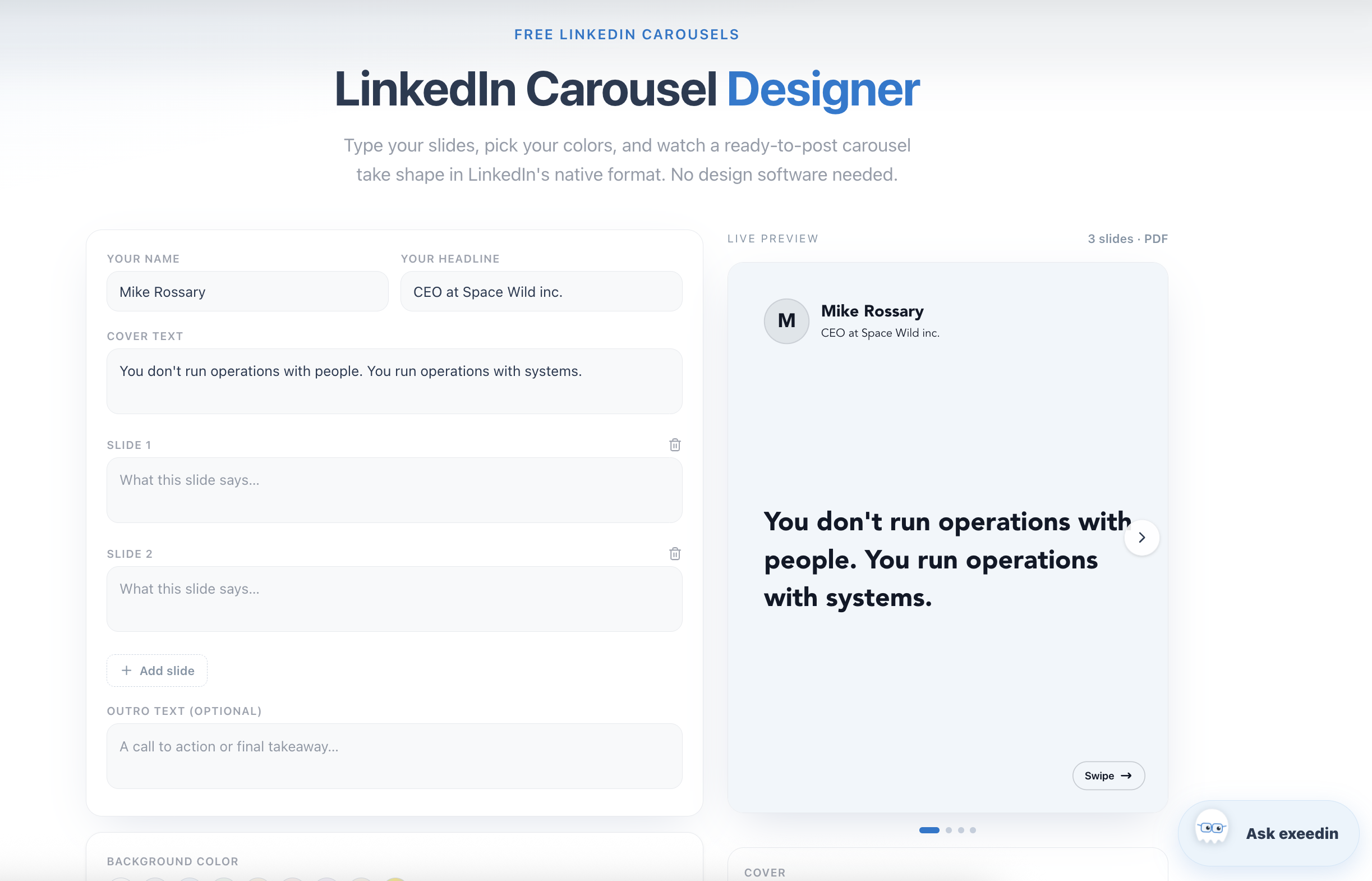
You write three things: a cover line, your slides, and an optional outro. The designer turns them into a native LinkedIn carousel:
LinkedIn's real format. Every slide is laid out at 1080x1350, the 4:5 portrait ratio LinkedIn documents use, and the carousel publishes as a true PDF document, not a strip of images.
Your face on every slide. Your photo, name, and headline sit on each slide the way a screenshot of a great post would, so every swipe reinforces your personal brand.
Colors that cannot go wrong. Pick any background and text color. The designer keeps backgrounds light and text dark automatically, so every combination stays readable on the feed.
Swipe cues built in. A next-slide arrow, in the style you choose, sits on every slide except the last, and a centered outro slide closes with your name.
Full Arabic support. Arabic text is shaped and aligned right to left with a proper Arabic font, and the published PDF matches the preview exactly.
Try exeedin free for 3 days
Write in your own voice, schedule, and grow on LinkedIn in English and Arabic. No credit card needed.
The One-Click Part: From Slides to Scheduled Post
Design tools stop at the export button. The Carousel Designer keeps going:
The caption writes itself. exeedin's AI ghostwriter reads your slides and writes the accompanying LinkedIn post, in your voice if your brand profile is set up. You can edit it or replace it entirely.
The PDF attaches itself. The carousel is rendered, named properly so LinkedIn shows a clean document title, and attached to the post.
You land on scheduling. Post now, or pick one of the recommended best times for your audience. The carousel is saved in My Posts either way.
That is the difference between a design tool and a content tool. Canva gives you a file. exeedin gives you a published post.
Why Busy Professionals Should Care
If you are a founder, consultant, or executive, your carousel ideas are already in your head: the five lessons, the three mistakes, the framework you explain in every sales call. The only thing between that idea and a high-performing post is production time. When production drops from an hour to five minutes, carousels stop being a special occasion format and become a weekly habit, and weekly carousels compound faster than almost anything else on LinkedIn.
A realistic five-minute workflow looks like this:
Minute 1: type the cover line, the one-sentence promise of the carousel.
Minutes 2 to 3: type one short slide per point. Five to eight slides is the sweet spot.
Minute 4: pick your background color and arrow style, toggle your headline on or off.
Minute 5: let the ghost write the caption, pick a posting time, done.
Try It Without an Account
The Carousel Designer is free to use in the browser. You can design the entire carousel, with the live preview, before creating an account. When you hit Post on LinkedIn, you sign up free, connect your LinkedIn profile, and the exact carousel you designed is waiting in your scheduler with its caption written.
If you are comparing tools first, our honest breakdowns of Taplio alternatives and the best LinkedIn marketing tools show where a built-in carousel designer fits in a full LinkedIn workflow.
Frequently Asked Questions
Is the LinkedIn Carousel Designer free?
Designing is completely free and requires no account. Publishing and scheduling happen through a free exeedin account, and paid plans add unlimited AI generation and scheduling volume.
What format does the carousel publish in?
A native LinkedIn PDF document at 1080x1350 per slide, the same 4:5 format LinkedIn's own document viewer uses. That is the format the algorithm treats as a carousel.
Can I use my own brand colors?
Yes. Both the background and text colors are fully customizable. The designer automatically keeps backgrounds light and text dark so every combination stays readable.
Does it work in Arabic?
Fully. Arabic slides are shaped and aligned right to left with a clear Arabic font, and the published PDF renders exactly like the preview.
Who writes the caption?
exeedin's AI ghostwriter turns your slides into an engaging caption automatically, and you can edit it or write your own before posting or scheduling.