Best LinkedIn Automation Tools in 2026, Ranked for Safety
The best LinkedIn automation tools in 2026 ranked by account safety: cloud vs extension, the limits LinkedIn enforces, verified prices, and what you should never automate.
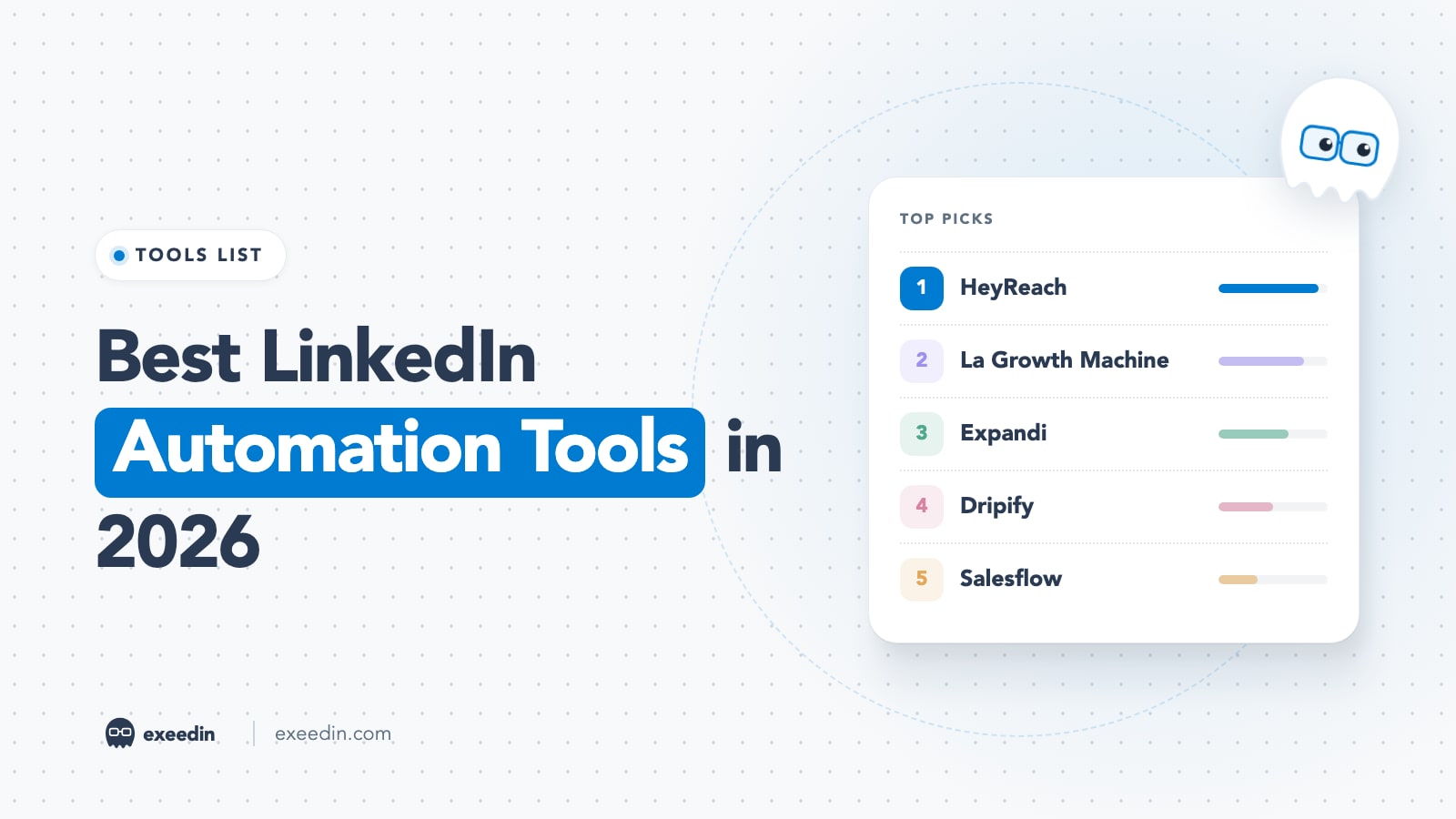
The best LinkedIn automation tools in 2026 for outreach are HeyReach, La Growth Machine, Expandi and Dripify, because they run in the cloud with warm-up and daily caps instead of clicking inside your browser. Every one of them still breaks LinkedIn's User Agreement, so the real choice is how much account risk you accept, and which tasks you keep fully human.
We reviewed the ten outreach tools people search for most, checked every vendor's pricing page in October 2026, and read LinkedIn's own Help Center rules on automation and invitation limits. You will get a safety-ranked list, the limits LinkedIn actually enforces, a section on what you should never automate, and the content tools that stay inside LinkedIn's rules. Prices checked October 2026.
Quick comparison: LinkedIn automation tools at a glance
| Tool | Best for | Starting price | Free plan | Standout feature |
|---|---|---|---|---|
| HeyReach | Agencies with many sender accounts | $79 per sender per month | No, 14-day trial | Unified inbox across senders |
| La Growth Machine | Multichannel sequences | €60 per identity per month | No, 14-day trial | LinkedIn, email, X and calls in one flow |
| Expandi | Careful cloud outreach | $99 per month | No, 7-day trial | Auto warm-up and dedicated IP |
| Dripify | Simple drip campaigns | $79 per user per month | No, 7-day trial | Visual sequence builder |
| Salesflow | Teams buying many seats | Check current pricing | No, 7-day trial | Volume seat discounts |
| Waalaxy | Beginners and solo users | €19 per month | No, 14-day trial | Fully cloud since July 2026 |
| lemlist | Email-first teams adding LinkedIn | $109 per month (Multichannel) | No, 14-day trial | Email and LinkedIn steps together |
| Meet Alfred | Small budgets | $29 per month, billed yearly | Trial available | Outreach plus post scheduling |
| Dux-Soup | People who want a local option | $55 per month | Not listed | Local desktop app or cloud |
| PhantomBuster | Data extraction workflows | $69 per month | Yes, 30 minutes per month | Hundreds of ready-made automations |
How we ranked these tools: the safety lens
We ranked by one question: run the way most people run it, how likely is this tool to get your account restricted? Four things decided the order.
- Where it runs. Cloud tools act from a server, so there is no extension in your browser for LinkedIn to spot. Extensions and desktop apps depend on your machine and session.
- Pacing controls. Warm-up for new accounts, daily caps you can lower, random delays and working hours. Tools that ship conservative defaults ranked higher.
- What it automates. Connection requests and follow-ups carry risk. Tools that also push automated likes, comments or endorsements ranked lower, because those create fake engagement.
- Honesty about risk. Expandi's own footer says it is not an official LinkedIn product and that you use it at your own risk. We trust vendors that say that more than vendors that promise "100% safe".
What LinkedIn's rules actually say about automation
Before you pick any tool, read the source. LinkedIn's Help Center article on prohibited software and extensions says LinkedIn does not permit third-party software, including bots and browser extensions, that scrapes, changes the appearance of, or automates activity on its website. Members who use them risk having their accounts restricted or shut down.
The LinkedIn User Agreement (effective November 3, 2025) spells it out in section 8.2. You agree not to use bots or other unauthorized automated methods to access the Services, add or download contacts, send or redirect messages, or create, comment on, like or share posts. You also agree not to use crawlers, browser plugins or add-ons to scrape profiles and other data.
The Automated activity on LinkedIn help page explains what happens when you are caught: you are asked to turn the tool off, access returns at the time shown on the notice, and repeat suspensions can lead to a permanent restriction. In plain terms, no outreach tool on this list is approved by LinkedIn. When this article says "safer", it means lower risk when used conservatively.
Is your profile ready for buyers who check you out?
Paste your profile link and see your score right away, with clear fixes for your headline, About section and experience. Free to start, no account needed.
Or open the free LinkedIn profile checker
LinkedIn limits in 2026: what is official and what is folklore
Very few of the limits people quote come from LinkedIn. Here is what the Help Center confirms, and what is only observed.
| Limit | What we know | Source |
|---|---|---|
| Weekly invitation limit | LinkedIn publishes no number. Restrictions follow sending many invitations in a short period, many ignored or spam-marked invitations, or suspected automation. | LinkedIn Help: types of restrictions |
| About 100 invitations per week | A ceiling observed by users, not published by LinkedIn. Treat it as a planning estimate. | Hublead invitation planner |
| Personalized invitation notes | Free members can add a personal note to five connection requests per month. Premium members get unlimited notes. | LinkedIn Help: invitation limit reached |
| Withdrawn invitations | You cannot re-invite the same person for up to three weeks after withdrawing. | LinkedIn Help |
| Network size | Maximum of 30,000 first-degree connections. | LinkedIn Help |
| Restriction length | Most invitation restrictions lift automatically within one week. LinkedIn cannot remove them on request, and you cannot buy more invitations. | LinkedIn Help |
Two takeaways matter. First, Premium does not buy a published higher invite cap; LinkedIn says Basic and Premium members are both subject to these limits. Second, acceptance rate is part of the signal: 80 well-targeted invitations a week are far safer than 80 sent to a cold list where most sit pending. If you want the deeper version, read our guide on whether there is a limit to how many LinkedIn invitations you can send.
The best LinkedIn automation tools in 2026, ranked
1. HeyReach: Best for agencies running many sender accounts
HeyReach is a cloud outreach platform built around senders: each LinkedIn account you connect runs its own sequences, and replies land in one unified inbox. Agencies pick it for running several clients at once.
Key features: connection requests, messages, voice notes and profile views with an "If connected" condition; per-sender daily limits enforced on every campaign; dedicated residential proxies on Growth; workspaces that separate client data; integrations with Clay, HubSpot, Zapier and Make; an MCP server for AI agents.
Pricing: Growth is $79 per sender per month, or $64 billed yearly. Agency is $999 per month with 25 senders and Unlimited is $2,999 per month, per HeyReach pricing. Growth has a 14-day trial with no card.
- Pros: per-sender caps are enforced by default, teammates are not charged, the unified inbox stops reps from logging into each other's accounts.
- Cons: costs climb fast with each sender, built for volume so it is easy to overreach, no free plan.
Who it is for: agencies and sales teams with several reps who want one place to manage pacing. If that is you, our LinkedIn automation guide for agencies covers client setup in more depth.
2. La Growth Machine: Best for multichannel sequences
La Growth Machine (LGM) runs sequences across LinkedIn, email, X and calls from the cloud, and its pricing page says it has no detectable extensions. Each "identity" is one person you send as.
Key features: waterfall email enrichment, LinkedIn engagement steps, AI voice messages, a unified LinkedIn and email inbox on Pro, social warming, A/B testing, and HubSpot and Pipedrive sync on Ultimate.
Pricing: Basic is €60 per identity per month and Pro is €120 per identity per month, per La Growth Machine pricing. There is a 14-day trial with no card, limited to one identity.
- Pros: spreads touches across channels so LinkedIn carries less of the load, strong enrichment, clear plan tiers.
- Cons: priced in euros with annual figures that are not printed clearly, more setup than single-channel tools, "social warming" steps still automate engagement.
Who it is for: B2B teams that already use email outreach and want LinkedIn as one step in a wider sequence. Switch off any automated like or comment steps.
3. Expandi: Best for careful cloud outreach
Expandi is a cloud tool that leads with safety. Each account gets a dedicated country-based IP address, and new profiles go through an automatic warm-up that starts small and grows.
Key features: ten campaign types, a sequence builder with if/then logic, connection requests plus email follow-ups, adjustable daily limits and action ranges, campaign recovery, duplicate prevention and a blacklist.
Pricing: Business is $99 per month, or $79 per month billed yearly, per Expandi pricing. Agency pricing is by request. There is a 7-day trial.
- Pros: warm-up and dedicated IP by default, honest risk disclaimer, good condition logic.
- Cons: one of the pricier single-seat tools, image and video personalization cost extra, still breaks LinkedIn's terms like every tool here.
Who it is for: founders and consultants running one account who want the most conservative defaults.
4. Dripify: Best for simple drip campaigns
Dripify runs campaigns on its own servers, so they continue when your laptop is closed. The drip builder is easy to read: invite, wait, message, follow up.
Key features: LinkedIn and email sequences, unlimited campaigns, built-in LinkedIn protection, a dedicated inbox, HubSpot integration, an open API and MCP server, plus team management, A/B testing and adaptive activity control on Advanced.
Pricing: Pro is $79 per user per month ($59 billed yearly) and Advanced is $99 per user per month ($79 billed yearly), per Dripify pricing. The 7-day trial needs no card.
- Pros: fast to learn, runs without your browser, adaptive activity control on Advanced.
- Cons: the best safety controls sit on the higher plan, per-user pricing adds up for teams.
Who it is for: solo sellers and small teams who want a clean visual builder without agency features.
5. Salesflow: Best for teams buying many seats
Salesflow is a cloud platform for teams and agencies that buy seats in bulk. Each account runs from a dedicated IP with randomized activity.
Key features: connection and message sequences, email sending, CRM sync with HubSpot and Salesforce, and white label on higher tiers.
Pricing: Salesflow's own pricing page blocked our checks, so check current pricing on salesflow.io. A third-party review read on October 8, 2026 listed Basic at $99 per seat per month with deeper discounts on annual multi-seat plans and a 7-day trial. That review is published by a competitor, which it discloses.
- Pros: good economics for large teams, dedicated IPs, vendor admits no tool can guarantee an account will never be restricted.
- Cons: pricing is hard to confirm, discounts need annual commitments, less useful for one person.
Who it is for: sales leaders rolling outreach out to a large team who will negotiate a contract anyway.
6. Waalaxy: Best for beginners and solo users
Waalaxy started life as a Chrome extension. According to its help center article dated July 1, 2026, it is now fully cloud based, runs at app.waalaxy.com, and the extension was pulled from the Chrome Web Store. That change moves it up the safety ranking compared with older reviews.
Key features: pre-built sequences, automated LinkedIn follow-ups, an email finder, CRM sync, and cold email on the Business plan. A unified inbox is a paid add-on.
Pricing: Pro is €19 per month with 300 invitations per month, Advanced is €49 and Business is €69, each with 800 invitations per month, per Waalaxy pricing. Each paid plan has a 14-day trial.
- Pros: cheapest serious option, monthly invitation caps keep beginners inside sane volumes, friendly onboarding.
- Cons: the inbox costs extra, older guides describing the extension are now out of date, fewer team controls.
Who it is for: freelancers and first-time users who want to test outreach on a small budget.
7. lemlist: Best for email-first teams adding LinkedIn
lemlist is a cold email platform first. Its Multichannel plan adds LinkedIn steps (profile visits, invitations, text and voice messages) to email sequences.
Key features: email sequences with deliverability tools, LinkedIn steps on Multichannel and Enterprise, a lead database with credits, and a Chrome extension for working in lemlist from LinkedIn.
Pricing: Email is $69 per month and Multichannel is $109 per month ($87 billed yearly), per lemlist pricing. LinkedIn steps need Multichannel. There is a 14-day trial.
- Pros: excellent for email, LinkedIn volume stays low because email does the heavy lifting.
- Cons: the cheaper Email plan has no LinkedIn steps, the pricing page does not say clearly how LinkedIn actions run.
Who it is for: teams whose outreach already lives in email.
8. Meet Alfred: Best for small budgets
We checked whether Meet Alfred is still alive in 2026: it is, with a 2026 footer and current plans on its pricing page. It is a cloud tool that covers LinkedIn, email and X outreach, plus social post scheduling.
Key features: connection requests, messages and follow-ups, multichannel sequences, a LinkedIn CRM and smart inbox, AI personalization, Sales Navigator support on higher tiers, and white label on Teams.
Pricing: billed yearly, Individual is $29 per month, Business is $49 and Teams is $39 per seat for three or more seats. Monthly prices did not display when we checked, so check current pricing before you buy.
- Pros: low entry price, many channels in one tool.
- Cons: monthly pricing unclear, a broad tool that does each job less deeply than specialists.
Who it is for: solo users who want outreach and some scheduling for one low annual price.
9. Dux-Soup: Best for people who want a local option
Dux-Soup is one of the oldest names here. Its pricing page now offers a local desktop app for Mac and Windows and a cloud version that runs without your computer staying on.
Key features: unlimited concurrent campaigns, AI personalization, campaign statistics, contact export, and integrations with Slack, Salesforce, Zapier and Make.
Pricing: the local version is $55 per month ($41.25 billed yearly) and the cloud version is $99 per month ($74.17 billed yearly), per Dux-Soup pricing.
- Pros: long track record, a cheaper local option, good integrations.
- Cons: the local version only works while your machine runs, older reviews describe a Chrome extension setup that may confuse buyers.
Who it is for: users who prefer software on their own machine, or who already know Dux-Soup.
10. PhantomBuster: Best for data extraction workflows
PhantomBuster is a library of automations ("Phantoms") that extract profiles, search results and post engagers for other tools. It ranks last on safety because scraping is named directly in LinkedIn's User Agreement.
Key features: ready-made automations for LinkedIn and other sites, scheduling, AI and email credits, CRM and spreadsheet exports.
Pricing: per PhantomBuster's July 2026 pricing explainer, Start is $69 per month with 20 execution hours, Grow is $159 with 80 hours and Scale is $439 with 300 hours. A free plan includes 30 minutes of execution per month.
- Pros: flexible, works across many sites, a real free plan for testing.
- Cons: billed by execution time, which is hard to predict; scraping carries the highest restriction risk; easy to collect data you have no lawful reason to keep.
Who it is for: growth and ops people who need data pipelines and understand the risk.
Cloud vs browser extension: which is safer?
Cloud tools are generally lower risk: no extension code runs inside your LinkedIn tab for the site to detect, and actions run at steady, paced intervals. Extensions and desktop apps depend on your session and often act in bursts when you open your laptop.
Cloud has its own risk: your session runs from a server or proxy elsewhere, which can trigger security checks, and a third party holds access to your account. The safer pattern is cloud tool, conservative caps, one account per person, and a human reading every reply. Our guide to LinkedIn account restrictions and how to fix them covers what to do if a tool trips a warning anyway.
Safe operating rules for any outreach tool
- Warm up new accounts. Start with a handful of invitations a day and grow over four weeks.
- Stay well under the observed weekly ceiling. Plan for 60 to 80 invitations a week. Hublead's planner targets 80% of the observed ceiling for the same reason.
- Target tightly. Low acceptance and spam reports are named restriction triggers in LinkedIn's Help Center.
- Withdraw old pending invitations after a few weeks so your pending count stays low.
- Keep working hours. Real people do not send messages at 3 AM every night.
- One person, one account. Never rent, buy or share LinkedIn profiles.
- Reply by hand. The moment a prospect answers, a human takes over.
What you should never automate on LinkedIn
The User Agreement names automated commenting, liking and sharing as inauthentic engagement, and people can tell.
- Comments. Auto-generated comments posted by a bot are the fastest way to look fake in front of exactly the people you want to impress. A comment is public and carries your name.
- DMs that pretend to be personal. "Loved your recent post about {topic}!" sent to 500 people is still a mass message, and recipients compare notes. We covered the cost of this in whether automated LinkedIn messages hurt your credibility.
- Likes, endorsements and auto-reposts. Engagement pods and bots create exactly the inauthentic engagement the User Agreement prohibits.
- Replies to people who answered you. A prospect who replies has raised their hand. Hand the conversation to a person.
- Mass profile viewing and scraping. LinkedIn restricts accounts that view too many pages, and scraping is prohibited outright.
Content tools that stay inside LinkedIn's rules
"LinkedIn automation" also gets searched by people who only want to post consistently. That job does not need a risky tool at all. LinkedIn has native post scheduling on desktop and mobile, with a time between 10 minutes and three months ahead.
Third-party scheduling tools that publish through LinkedIn's official Share on LinkedIn API are also fine, because you grant them a posting permission through LinkedIn's own sign-in instead of handing over a cookie. exeedin works this way: it is a ghostwriter that drafts posts in your own voice, you read and approve every post, and it publishes at the time you pick through the official API. Its Engage page suggests comments, but you copy, edit and post them yourself on LinkedIn, which keeps the human part human. For a wider list, see our roundup of the best LinkedIn scheduling tools.
How to choose a LinkedIn automation tool
- You only want to post consistently: skip outreach tools entirely and use native scheduling or an official-API scheduler.
- You are one founder testing outreach: Waalaxy or Expandi, with caps set well below the defaults.
- Your outreach already lives in email: lemlist or La Growth Machine, so LinkedIn handles fewer touches.
- You run several client or rep accounts: HeyReach or Salesflow for per-sender controls and a shared inbox.
- You mainly need data: PhantomBuster, accepting the highest risk, or a compliant data provider instead. Our list of LinkedIn lead generation tools includes options that do not touch your account.
- You are building a personal brand more than a pipeline: read how to choose an automation tool for personal branding first, because the right answer there is usually less automation.
Whatever you choose, budget the full cost. Many teams pair these tools with a Sales Navigator subscription for targeting, which is a separate bill, and a restricted account can cost you a week of selling.
Frequently Asked Questions
Is LinkedIn automation allowed?
No outreach automation tool is approved by LinkedIn. The User Agreement bans bots and unauthorized automated methods for adding contacts, sending messages and engaging with posts, and the Help Center says accounts using such software risk restriction or closure. What LinkedIn does allow is native post scheduling and apps that publish through its official API with your permission, since you still write and approve the content.
What is the safest LinkedIn automation tool?
No tool is risk-free, but cloud tools with warm-up, adjustable daily caps and dedicated IPs, such as HeyReach, La Growth Machine, Expandi and Dripify, carry less risk than browser extensions. How you use the tool matters more than which one you buy. Low volumes, tight targeting, working hours and human replies keep you far safer than any vendor feature.
How many connection requests can I send per week on LinkedIn?
LinkedIn does not publish a number. Its Help Center says restrictions follow sending many invitations quickly or having many ignored or spam-marked. Users and tool vendors observe a ceiling of about 100 invitations per week. A safer plan is 60 to 80 well-targeted invitations a week, with old pending invitations withdrawn regularly.
Can LinkedIn detect cloud automation tools?
Yes, it can. Cloud tools remove the extension LinkedIn could spot in your browser, but LinkedIn also looks at behavior: volume, timing, acceptance rates, spam reports and logins from unusual locations. LinkedIn's help page lists suspected use of an automation tool as one reason invitations get restricted, whichever way the tool runs.
Is scheduling LinkedIn posts considered automation?
Scheduling a post you wrote and approved is fine. LinkedIn offers native scheduling on desktop and mobile, and third-party tools can publish through the official Share on LinkedIn API with your permission. The risk sits with tools that log in with your cookies or that automate comments, likes and messages on your behalf.
What happens if LinkedIn catches me using automation?
Usually a temporary restriction. LinkedIn asks you to turn the tool off, and access returns at the time shown on the notice; most invitation restrictions lift within a week and cannot be removed on request. Repeat offenses can lead to a permanent restriction, which is why one restricted account can cost more than a year of any tool's subscription.